Google search is way more interesting that I thought
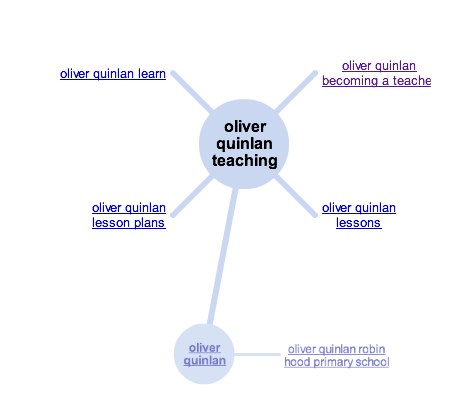
Lisa Thumann showed us some fantastic ways to refine, drill down, and present search results. I would recommend anyone to explore the ‘More search options’ on the left hand side of the screen after searching, as there are some very powerful tools there. Putting results on a timeline, realtime results, and even searching images for just faces! My personal favourite was the ‘Wonder Wheel’, which allows to visually refine your search terms and results. I think this is going to be invaluable for teaching search skills to my classes.
Google Spreadsheets are amazing
Ronald Ho gave an upbeat and inspiring presentation on some of the features of Google Spreadsheets. I knew these were a great solution for collaborating on spreadsheets, but the features he showed really made me think Google is redefining the medium of spreadsheets. What did it for me was the way they can deal with text and not just numbers, and the way you can actually use Google Lookup to pull data from across the web into a spreadsheet. I’ll leave it to kvnmcl to show you some of the best features we were shown…
Google Apps to replace Photoshop, Audacity and even Garage Band
I was aware of the Google Apps Marketplace, but I had no idea it contained such powerful tools, and the fact that some of them were free. Kern Kelley showed us an amazing demonstration of Aviary– which provides a Photoshop like web based image editor, and an Audacity/Garage band like audio editor. This also integrates into Google Apps so it sits along side calendar, mail, docs and the like, eliminating the need for another username and password, and it even saves documents in the Google Apps documents area. Can’t wait to get this going for our Google Apps setup at school.
Google Apps really could replace a VLE
I had always seen Google Apps as being really powerful tools for various uses, but I had never really got into Google Sites. Sites is Googles answer to web page creation and wikis, and it really ties together all of their other tools. This was powerfully demonstrated by the resources created for the GTA, which were fantastic, but also update dynamically as the event progressed. This tied together the presentations, docs, spreadsheets and links into a coherent whole and, along with the various gadget available for embedding third party content into the Google system, made many of us question why we should pay for VLE’s when all this is available for free. This was made even more powerful by the demonstration of the previously mentioned Aviary, and Mark Allen‘s fully functioning ‘VLE Ecosystem’, which he has used at his school to tie together Google and various third party tools. I know what I would choose if I was called on to set up a VLE in future…
Google Docs does OCR
…on any image or PDF. Just tick the box when you upload and it will give you an editable Google Doc of any text.
Cloud tools make for a great conference experience
The second day says it all for me in terms of using these tools. We arrived in the morning with nothing but a blank spreadsheet with spaces for 3 sessions of talks. It was shared with the whole cohort and within minutes we had a structured timetable of workshops for the day, both from people volunteering to lead sessions and people requesting further sessions on things we had not covered.
When I came to show my presentation there was no fumbling with cables setting up my own laptop and changing screen resolutions and layouts (although I did have to plug the sound in!). I simply walked up to the front and clicked play on my presentation embedded in the Google site / wiki for the event. It also allowed my presentation to be shared with people across the Atlantic before I had even finished talking. If everyone used these tools for events like this when they are presenting it would make everything run much smoother, as well as allowing interaction through the ability to follow links from presentations to look at examples on your own laptop whilst the person is actually presenting. It was great to work with a cohort of people who were all familiar users of these collaborative tools… now we just need to make sure more people know what huge potential they have and start using them!
Google Books
I had come across Google Books in searches before, but I never really made sense of it. Is it a service for free ebooks? Is it designed for previewing books before you you? It made a lot more sense when described by Mark Wagner as a way to allow Google to index and search the knowledge ‘locked up’ in books. Mark described how he had created a ‘Book shelf’ of all of the books he actually owned by inputting the titles into his Google Books account. This then allowed him to use Google’s search to query the full text content of the books on his shelf, and then go to the exact pages he needed, hence saving hours of time rifling through them looking for specific passages. An excellent idea for anyone with a large book collection, or even for using before hitting the shelves at a University library. I will certainly be using this (alongside Google Scholar) to cut down on searching for reading as I continue to work on my MA.
Google Earth
…is much more interesting than I thought. I have never understood the distinction between Google Earth and Google Maps. I am not sure that I do still, but I certainly know some great things you can do with Google Earth thanks to an excellent presentation by Doug Belshaw. One example that particularly struck a chord with me was his demonstration of using image overlays to place a map of the effects of the Great Fire of London over the Google Earth images of modern day London. I struggled to explain to my class the scale of the fire, and how the scale of the city of London had changed since 1666, this will make it so much clearer to show them in future. I was also particularly impressed with how Doug used Google Earth as a presentation tool by embedding his slides in place markers for various locations and flying around the Earth to each slide. If I ever need to do a presentation with content rooted in place and locations I will certainly try doing the same.
Apparently, Google Earth Pro and Sketchup Pro are now free for Educatiors, more info here.
There were many other highlights, and I will be returning to the things I learned time and again in the future as I find applications for the things I learned how to do with these tools. For those of you who were not able to make it to the GTA, or anyone who wants to learn some really in depth things about the Google suite of tools, all the presentations and wiki based resources from the day are freely available from the Google Teacher Academy Resources page. This page is based around an Agenda from the day, but just follow the links for each session to see the presentations, and all the workshop tasks and additional links. The GTA team deserve lots of respect, not merely for putting on a brilliant event but also for making this knowledge free to anyone who wants to learn more.
Now, to start planning where to begin with integrating these tools into my practice for next year…


Leave a Reply